













































Scheduling on Paper vs Software: The Real Differences for Gas Engineers
- 1. Booking a Job In
- 2. When Plans Change Mid-Day
- 3. Keeping Your Team on the Same Page
- 4. What Gas Engineer Scheduling Software Actually Costs (Beyond Money)
- 5. Your Customers Notice the Difference
- 6. Growing Without the Growing Pains
- 7. It All Connects
- 8. Making the Switch
- 9. Gas Engineer Software is 100% free to try.
- 1. Booking a Job In
- 2. When Plans Change Mid-Day
- 3. Keeping Your Team on the Same Page
- 4. What Gas Engineer Scheduling Software Actually Costs (Beyond Money)
- 5. Your Customers Notice the Difference
- 6. Growing Without the Growing Pains
- 7. It All Connects
- 8. Making the Switch
- 9. Gas Engineer Software is 100% free to try.
A paper diary has done the job for decades, but gas engineer scheduling software has changed what “doing the job” looks like. Here’s what actually shifts when you make the swap — and where it matters most.
- 1. Booking a Job In
- 2. When Plans Change Mid-Day
- 3. Keeping Your Team on the Same Page
- 4. What Gas Engineer Scheduling Software Actually Costs (Beyond Money)
- 5. Your Customers Notice the Difference
- 6. Growing Without the Growing Pains
- 7. It All Connects
- 8. Making the Switch
- 9. Gas Engineer Software is 100% free to try.
- 1. Booking a Job In
- 2. When Plans Change Mid-Day
- 3. Keeping Your Team on the Same Page
- 4. What Gas Engineer Scheduling Software Actually Costs (Beyond Money)
- 5. Your Customers Notice the Difference
- 6. Growing Without the Growing Pains
- 7. It All Connects
- 8. Making the Switch
- 9. Gas Engineer Software is 100% free to try.
Booking a Job In
On paper, you grab your diary — assuming it’s nearby — flick to the right week, pencil in the job, and hope you can read it later. If you’re not near the diary, you jot it on a scrap of paper and tell yourself you’ll transfer it when you get home. Sometimes you do.
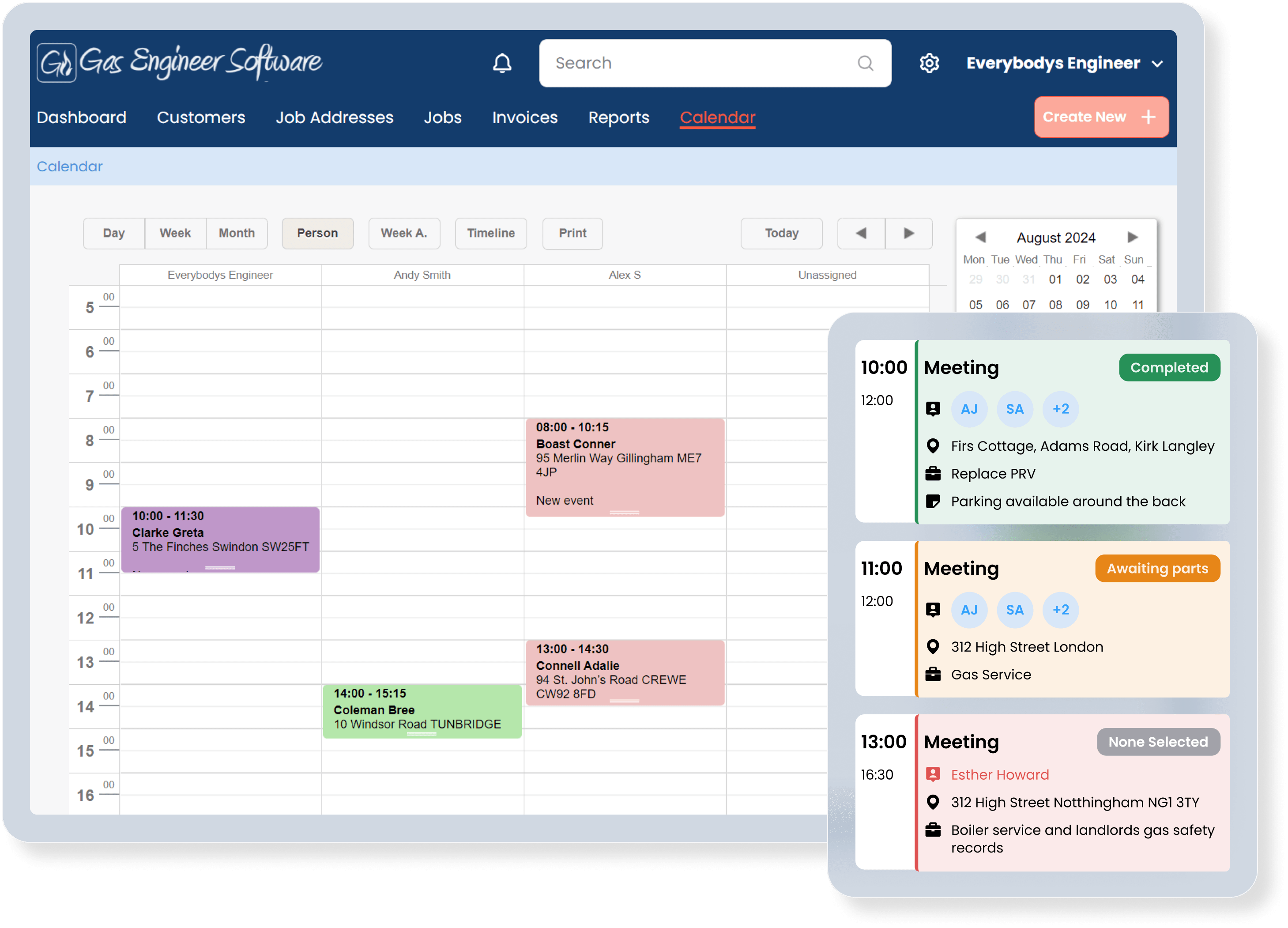
With a scheduling app, you open your calendar on your phone, see which slots are free, tap to create the job, and it’s done. If the customer’s already on your system, their address and history auto-fill. One booking doesn’t feel that different — but over dozens a week, the saved time and avoided errors add up fast.
| Booking a New Job | |
| 📄 Paper | 📱 Digital |
| 1. Customer calls while you're on site ↓ |
1. Customer calls while you're on site ↓ |
| 2. Find diary (van? kitchen? pocket?) ↓ |
2. Open scheduling app on your phone ↓ |
| 3. Flip to the right week ↓ |
3. See all free slots at a glance ↓ |
| 4. Pencil in job, scribble address ↓ |
4. Tap to create job, details auto-fill ↓ |
| 5. Hope you can read it later | 5. Job saved, customer notified instantly |
When Plans Change Mid-Day
On paper, a booking change or emergency call-out means squeezing in time, rescheduling jobs, and potentially getting in touch with your team.
With software, you simply change the date and everyone’s schedule updates instantly.
| Rescheduling an Afternoon | |
| 📄 Paper | 📱 Digital |
| 1. Emergency call comes in ↓ |
1. Emergency call comes in ↓ |
| 2. Cross out afternoon jobs in diary ↓ |
2. Drag afternoon job to another day ↓ |
| 3. Rewrite them on different days ↓ |
3. Drop emergency into the free slot ↓ |
| 4. Phone/text each engineer individually ↓ |
4. All engineers see updates instantly ↓ |
| 5. Hope everyone gets the update | 5. Affected customer notified automatically |
Keeping Your Team on the Same Page
If you’re a sole trader, your schedule just needs to live wherever your phone lives. Simple enough.
But with a small team — even two or three engineers — paper diaries cause headaches fast. With job management software, everyone sees the same live schedule. You can check workloads at a glance, spot who’s overbooked, and assign jobs without a single phone call.
| Coordinating a Team's Day | |
| 📄 Paper | 📱 Digital |
| 1. Write each engineer's jobs in the diary ↓ |
1. Assign jobs on the shared calendar ↓ |
| 2. Photocopy or text them their list ↓ |
2. Engineers see their schedule on their phone ↓ |
| 3. Changes? Phone everyone individually ↓ |
3. Changes sync to everyone in real time ↓ |
| 4. Check wall planner matches van diaries ↓ |
4. One schedule, always up to date ↓ |
| 5. Rely on memory if details conflict | 5. Check workloads and capacity at a glance |
What Gas Engineer Scheduling Software Actually Costs (Beyond Money)
Scheduling software like GES costs a monthly subscription. On the face of it, paper is cheaper — but that isn’t the full story.
The real cost of paper isn’t the diary — it’s the time. It’s the twenty minutes each evening tidying up tomorrow’s schedule. It’s the double-booking that costs you a customer. It’s the job details you can’t find because they’re in last month’s diary, which is somewhere in the van. It’s the quote you forgot to follow up on because there was no reminder.
Software has a clear, predictable cost, and engineers find that the time they save each week lets them fit in extra jobs that more than cover the subscription.
Your Customers Notice the Difference
Your schedule is invisible to your customers, but the effects of it aren’t. When you’re running on paper, confirmations are manual (or forgotten), reminders don’t go out, and ETAs are a best guess based on what you remember is before that job.
Software changes this quietly but powerfully. Appointment confirmations remind customers of their booking, automated reminders go out before service due dates, and you find yourself turning up on time more often.
Growing Without the Growing Pains
As your team grows, manual scheduling starts to become increasingly complicated to manage. Meanwhile, a digital scheduling system scales without that worry. Adding a new engineer means adding them to the system — not hiring admin staff to manage their days.
You get visibility over everyone’s schedule and can balance workloads properly without relying on one person’s memory.
It All Connects
With a paper diary, your schedule, your quotes, your certificates, and your invoices all exist separately. Every job means entering the same customer details, the same address, the same job description — over and over, from scratch.
With an all-in-one system like GES, a single job entry flows through your entire workflow. The quote becomes a scheduled job, which generates a certificate, which triggers an invoice. If you ever need to go back and find something, it’s all there.
Making the Switch
The mechanics don’t change — you’re still booking jobs into time slots. You’re just doing it on a screen instead of a page. Most engineers pick it up within a few days, and you don’t have to go cold turkey — run software alongside your diary for a week and you’ll quickly see which one you reach for first.
Gas Engineer Software offers a free trial — no card required. Or watch the demo to get a feel for it in a few minutes.