

























[New Feature] Calendar Integrations: Sync Your GES Events To Google, Apple & Other Calendars
One of our most requested features has been to integrate with external calendars like Google, Apple, and Outlook. Having work jobs live in GES allows you to connect events with customer histories, records, and much more — but what when you need to plan around a personal event?
As of the most recent update, you can sync your GES events to your external calendar so you can see everything in one place, never double-book, and have one less thing to worry about.
Vote on what gets added next to Gas Engineer Software & suggest your own ideas on our feature request board!
What’s New?
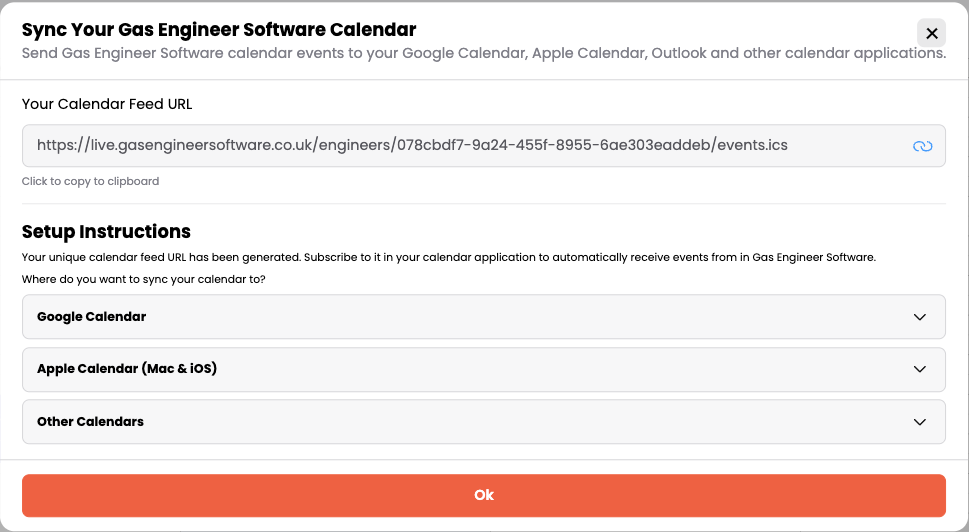
You can now subscribe to your Gas Engineer Software calendar from Google Calendar, Apple Calendar, Outlook, or any other calendar app that supports calendar feeds.
Each engineer gets their own private calendar feed URL. Paste it into your calendar app once, and your jobs appear automatically — and stay updated whenever something changes in your schedule.
It works through a standard calendar feed one-way sync. Changes you make in Gas Engineer Software flow straight into your personal calendar. Job reschedules, new bookings, cancellations — they all update without you lifting a finger.
Your personal events will not sync into your GES calendar, however.
How This Changes Your Workflow on the Job
Before this update, most engineers were:
- Manually copying jobs into their personal calendar in order to keep everything in one place.
- Double-booking themselves for weekends, school runs, or appointments
- Checking both the GES calendar and their personal calendars
With calendar sync turned on:
- Your work and personal life sit side-by-side in one view
- You can add jobs and events in GES, but use your personal calendar as your daily-driver schedule.
- New jobs and changes appear automatically
How to Use the New Feature
Setup takes less than a minute:
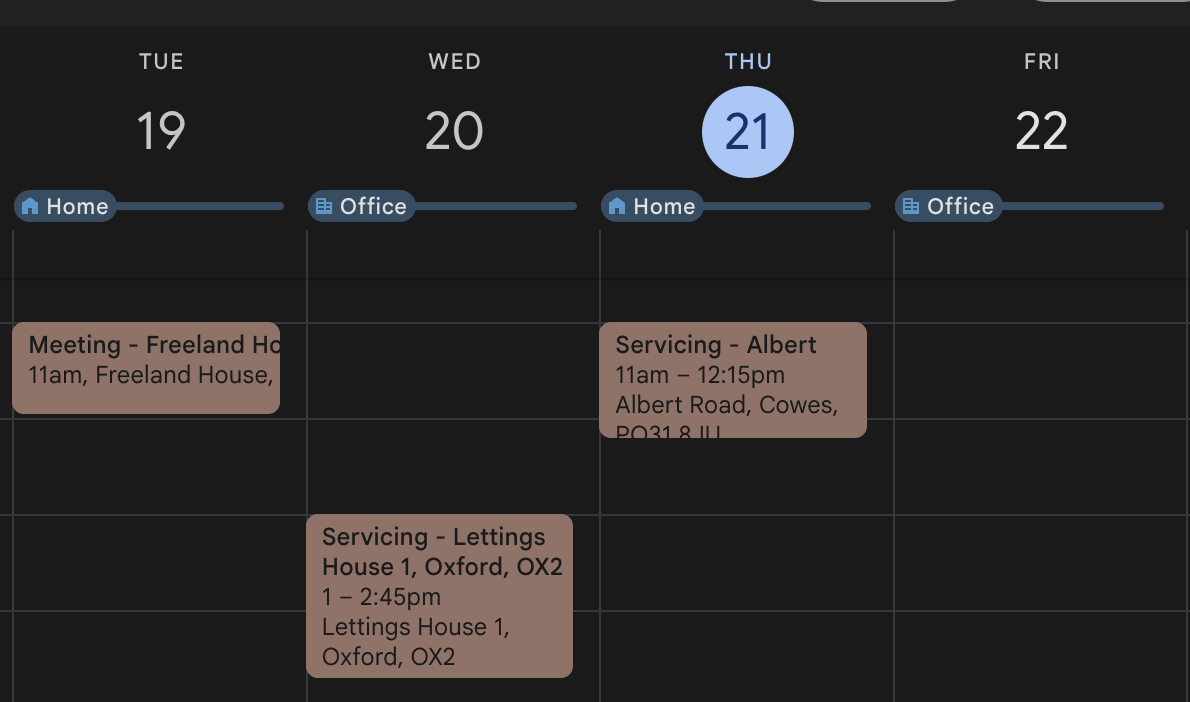
- Log in to the web portal and head to the Calendar page
- Click Calendar Integration and copy your unique feed URL
- In Google Calendar, click the + next to Other calendars and choose From URL — paste the URL and click Subscribe
- In Apple Calendar (Mac), go to File → New Calendar Subscription. On iOS, Settings → Calendar → Add Account. Paste your URL
- In Outlook, add a calendar from the internet and paste the URL
Your jobs will appear in your chosen calendar within a few minutes.
A few things worth knowing:
- Subscribed events are read-only in your external calendar. To make changes, open up Gas Engineer Software, edit the event, and it will re-sync.
- The feed includes 90 days of past jobs and 180 days ahead, which keeps your calendar tidy.
- Updates can take a few minutes to show up, depending on how often your calendar app fetches the feed.
- Your feed URL is unique and personal — keep it private.
- Apple Calendar will refresh every 5-60 minutes, while Google Calendar will refresh every 12-24 hours.
For the full step-by-step instructions across each calendar app, head to our help centre guide.
More Updates Are Already in Development
This is one of several updates we’ve shipped recently — you can also now access boiler manuals directly in the app, with more on the way.
If you’ve got an idea for what we should build next, drop it on our feature request board, or get in touch directly. The most-requested ideas tend to be the ones we ship first.