












































How to Manage Work for a Team of Gas Engineers (A Practical Blueprint)
- 1. Scheduling work across multiple engineers
- 2. One shared calendar everyone can see
- 3. Job statuses: knowing where every job actually is
- 4. Job history: the paper trail that protects you
- 5. A customer database the whole team can use
- 6. Bringing it together: your team needs one source of truth
- 7. How Gas Engineer Software handles all five
- 1. Scheduling work across multiple engineers
- 2. One shared calendar everyone can see
- 3. Job statuses: knowing where every job actually is
- 4. Job history: the paper trail that protects you
- 5. A customer database the whole team can use
- 6. Bringing it together: your team needs one source of truth
- 7. How Gas Engineer Software handles all five
As a sole trader, your whole business lives in your head, and you know exactly what you need to do to get the job done. But the moment you take on a team, that system breaks. The information has to live somewhere everyone can reach
This guide covers the five things you need to get right when you start managing work across a team: scheduling, a shared calendar, job statuses, job history, and a reliable customer database. Teams with these in place work smoothly and don’t spend their evenings firefighting.
If you’re at the very start of this journey, read our guide on hiring your first engineer.
Scheduling work across multiple engineers
Scheduling for one person is just a to-do list with times on it. Scheduling for a team is a different job: you’re matching the right engineer to the right job, in the right order, while minimising driving time.
A few things you’re now juggling that you weren’t before:
- Skills and experience. Not every engineer can do every job, especially if you’ve hired somebody more junior. Whoever books the work needs to consider this to reduce callbacks and return visits.
- Location and routing. Two jobs in the same town on the same day should go to the same engineer where it makes sense. Dead mileage is wasted hours and wasted fuel.
- Who actually owns the diary. When it’s just you, you are the diary. With a team, someone has to be responsible for booking work in and everyone has to be looking at the same version of it.
The trap most growing businesses fall into is keeping the diary in one person’s notebook or a personal phone calendar, then trying to relay it by text and phone call. It works for a fortnight, then a job slips through. If you’re weighing up the move from a paper diary to something shared, we’ve broken down the real differences in scheduling on paper versus software, and scheduling on GES shows how this works when every engineer sees their own jobs update in real time.
One shared calendar everyone can see
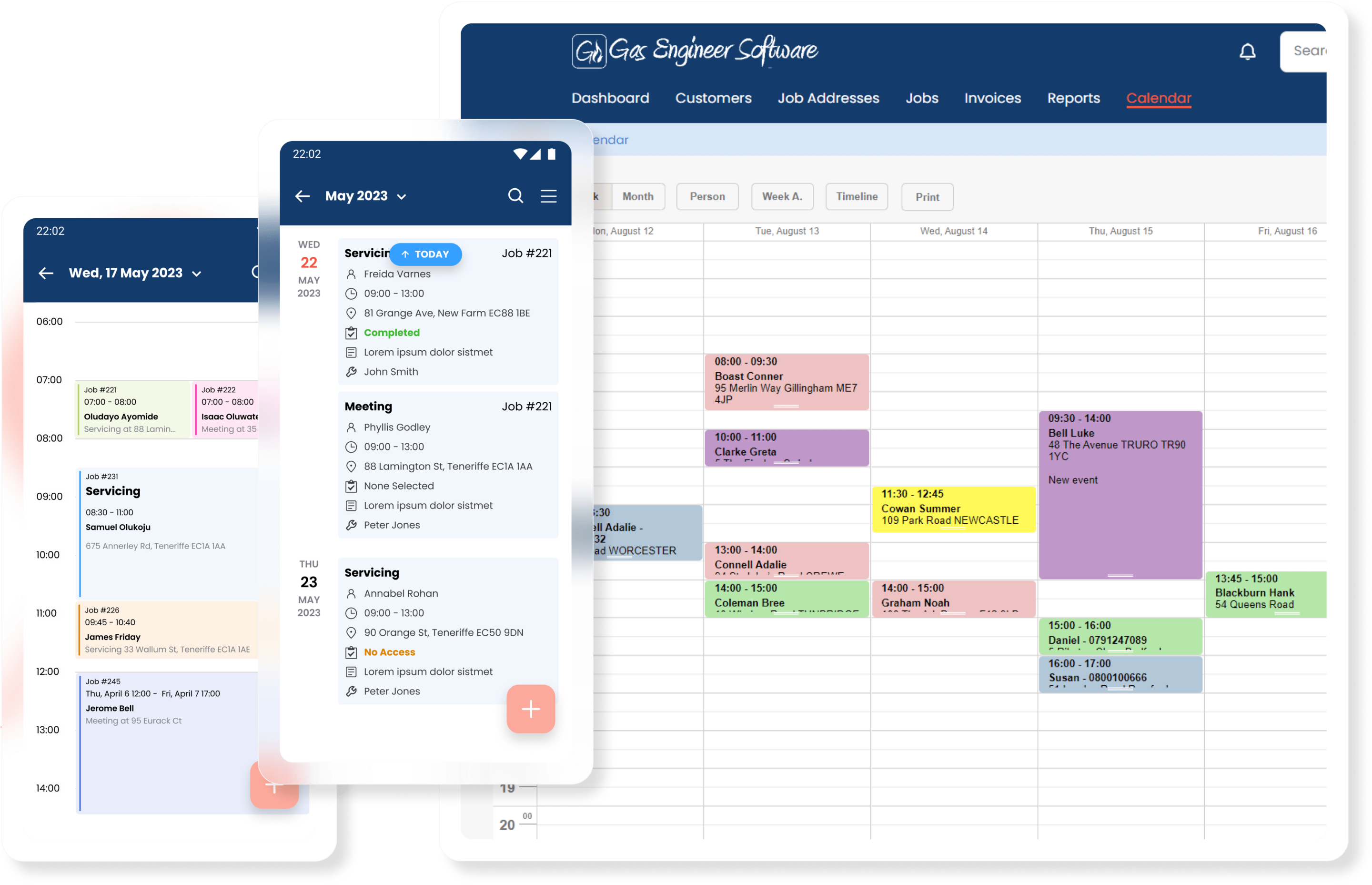
Once more than one person is booking and doing work, you need a single calendar that shows the whole team’s week at a glance, not a separate diary per engineer that only they can see.
The point of a shared, multi-engineer calendar is visibility. You should be able to look at one screen and see who’s free Thursday afternoon, who’s already stacked out, and where the gaps are. When you book or move a job, the change needs to reach the engineer in the field straight away, not at the next time they happen to call in.
This is where a wall planner or a shared Google Calendar starts to break. They’re fine for showing what’s booked, but they don’t connect the booking to the job details, the customer, or a history. You end up with the calendar saying one thing and the real information living somewhere else.
GES offers team-oriented scheduling with a colour-coded calendar and engineer filters. If engineers prefer to run their day on an external calendar like Google or Apple, you can always sync your GES events to that calendar.
Job statuses: knowing where every job actually is
With a team, jobs are happening that you’re not present for — and without a way to see where each one’s got to, the only way to find out is to ring the engineer and interrupt them.
The fix is a simple, agreed set of statuses that every job moves through. Something like:
- Booked — in the diary, not started
- In progress — engineer’s on site / first visit completed
- On hold / needs parts — can’t finish yet, and everyone can see why
- Complete — work done, not yet invoiced
- Invoiced — billed and waiting on payment
You don’t need anything more complicated than that to start. What matters is that the status is visible to whoever’s in the office, so nobody’s chasing engineers for updates and no job quietly sits in limbo for three weeks because everyone assumed someone else was on it. This is the heart of proper job management: every job has a state, and that state is honest.
Job history: the paper trail that protects you
Every job your team completes leaves a record. When something was done, who did it, what was fitted, what the readings were, and the certificate or photos to back it up.
A solid job history protects you when it matters. A customer disputes what was done? It’s on the record. A boiler fitted eight months ago throws a fault and a different engineer picks up the callback? They can see exactly what was installed and what was checked, before they even knock on the door. A warranty claim needs proof of a service? It’s there with the date attached.
The businesses that handle this well stop treating records as paperwork to file and start treating them as part of the job. Moving certificates and job records off paper is the obvious first step, and our guide to going paperless walks through how, and why it pays off faster than most people expect once a team is involved.
A customer database the whole team can use
This is the one that quietly causes the most damage. When customer details are scattered across your business, it becomes increasingly difficult to provide a best-in-class service.
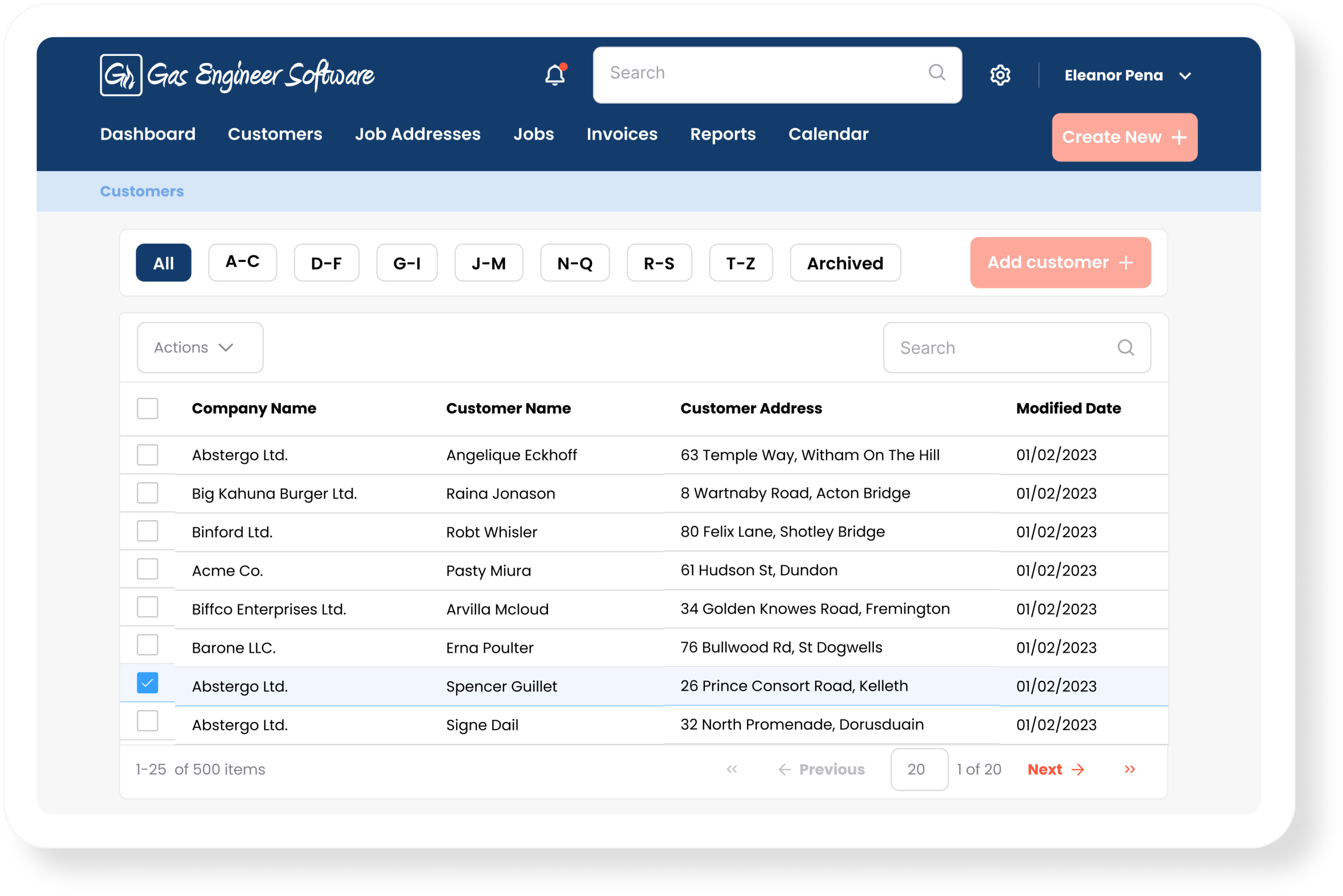
A shared customer database that everyone works from changes that. Each customer’s details, job history, and service dates sit in one place that anyone can pull up while taking a call or visiting a property.
There’s a hidden benefit to having an organised customer database, too: automated reminders for boiler servicing, unpaid invoices, and even quotes.
We wrote a full piece on keeping track of customer details, and GES is built around a CRM that does everything a heating business needs.
Bringing it together: your team needs one source of truth
Look back at those five things (scheduling, the calendar, job statuses, job history, and the customer database) and you’ll notice they’re not really separate problems. They’re the same information seen from different angles.
The reason growing businesses end up firefighting isn’t that they ignore these things. It’s that they handle each one in a different place: the diary on paper, the customer details in a phone, the job notes in a glovebox, the statuses in people’s heads.
How Gas Engineer Software handles all five
This is exactly what Gas Engineer Software was built to do for growing teams. Scheduling and a shared multi-engineer calendar so everyone sees the same week and jobs land on the right engineer’s phone. Job statuses so the office knows where everything is without ringing round. A full job history with certificates and photos attached to every job. And a shared customer database so the details stay with the business, not in one person’s pocket.
Create an account to try GES for free for 14 days. You’ll have access to every feature, can invite your team to join you, and there’s no card required.